
 Kontakt
 Jak nakupovat
Doručení
Nákupní rádce
 Angličtina
 59 b
59 b
30 dní na vrácení zboží
Zákazníci také koupili



 /
/
 Brožovaná
 434
Kč
434
Kč







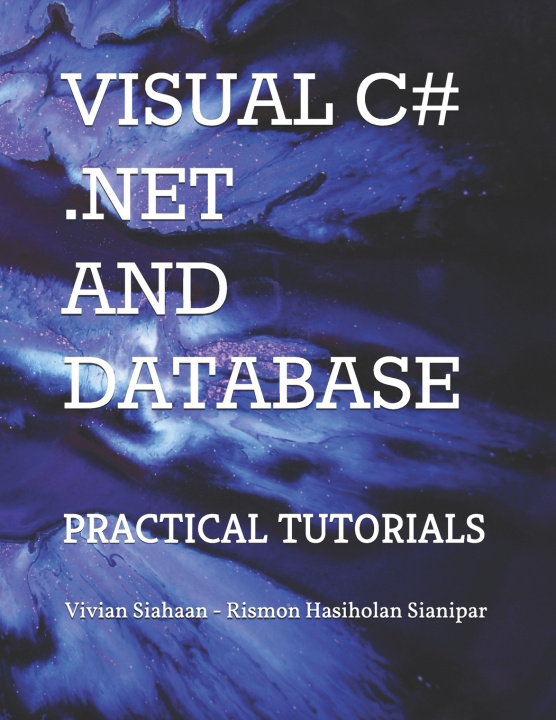
This book aims to develop a database-driven desktop application that readers can develop for their own purposes to implement database-oriented digital image processing, machine learning, and image retrieval applications.In Tutorial 1, you will perform the steps necessary to add 6 tables using Visual C# into ImageProc database. This table has sixteen fields: OfficerID, FirstName, LastName, RegNumber, BirthDate, AppDate, Gender, Status, Rank, Address, Mobile, Phone, Email, Description, PhotoFile, and FingerFile). You need seventeen label controls, two picture boxes, ten text boxes, two comboxes, one check box, two date time pickers, one openfiledialog, and one printpreviewdialog. You also need four buttons for navigation, eight buttons for utilites, one button for searching officer's name, one button to upload officer's photo, and one button to upload officer's fingerprint.In Tutorial 2, you will perform the steps necessary to create and implement police station form. In this tutorial, you will build such a form for PoliceStation table. This table has seven fields: PSID, OfficerID, PSName, City, Address, Phone, and Description. You need eight label controls, six text boxes, two comboxes, one check box, and one printpreviewdialog. You also need four buttons for navigation, eight buttons for utilites, and one button for searching officer's name. Place these controls on the form.In Tutorial 3, you will build such a form for Accused table. This table has thirteen fields: AccusedID, FullName, MotherName, CrimeCase, BirthDate, Gender, Address, Mobile, Phone, Email, Description, PhotoFile, and FingerFile). The form will also have the capability of navigating from one record to another. You need fourteen label controls, two picture boxes, nine text boxes, two comboxes, one date time picker, one openfiledialog, and one printpreviewdialog. You also need four buttons for navigation, eight buttons for utilites, one button for searching accused's name, one button to upload accused's photo, and one button to upload accused's fingerprint.In Tutorial 4, you will build such a form for Witness table. This table has thirteen fields: WitnessID, FullName, MotherName, CrimeCase, BirthDate, Gender, Address, Mobile, Phone, Email, Description, PhotoFile, and FingerFile). You need fourteen label controls, two picture boxes, nine text boxes, two comboxes, one date time picker, one openfiledialog, and one printpreviewdialog. You also need four buttons for navigation, eight buttons for utilites, one button for searching witness's name, one button to upload witness's photo, and one button to upload witness's fingerprint.In Tutorial 5, you will build such a form for Victim table. This table has thirteen fields: VictimID, FullName, MotherName, CrimeCase, BirthDate, Gender, Address, Mobile, Phone, Email, Description, PhotoFile, and FingerFile). You need fourteen label controls, two picture boxes, nine text boxes, two comboxes, one date time picker, one openfiledialog, and one printpreviewdialog. You also need four buttons for navigation, eight buttons for utilites, one button for searching victim's name, one button to upload victim's photo, and one button to upload victim's fingerprint.In Tutorial 6, you will build such a form for CrimeReg table. This table has fourteen fields: CRID, CRNumber, PSID, VictimID, AccusedID, DateReport, DateCrime, Arrested, CaseStatus, Description, Feature1, Feature2, Feature3, and Feature4. You need thirty two label controls, seven text boxes, ten comboxes, one check box, two date time pickers, six picture boxes, and one printpreviewdialog. You then need four buttons for navigation, eight buttons for utilites, and one button for searching crime register number. You also need button to save every feature.


Informace o knize
Angličtina
Kategorie

Darujte tuto knihu ještě dnes
Je to snadné
1 Přidejte knihu do košíku a zvolte doručit jako dárek 2 Obratem vám zašleme poukaz 3 Kniha dorazí na adresu obdarovanéhoMohlo by vás také zajímat

 /
Brožovaná
299
Kč
/
Brožovaná
299
Kč


 /
Brožovaná
1 115
Kč
/
Brožovaná
1 115
Kč